Friday, May 29, 2020

Cloud Models


IaaS allows users to rent the infrastructure itself: servers, data center space, and software. The biggest advantage of renting, as opposed to owning, infrastructure is that users can scale up the amount of space needed at any time. 

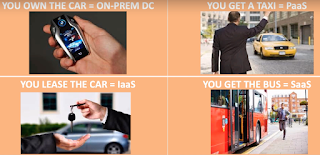
Real life example: When you want to try out different car models, you go for car lease / car rent.  Cloud example:  Similarly IaaS is renting the infrastructure i.e. creating a virual server in the cloud environment

PaaS allows developers to create applications, collaborate on projects, and test application functionality without having to purchase or maintain infrastructure. 

Real life example: On need of car ride without self driving and own car, you hire a taxi like Uber, OLA, etc.  Similarly PaaS is hiring the readily available product platform i.e. Microsoft's fully managed Azure SQL Server.

SaaS is on the top of the stack because users interact primarily with software hosted on the cloud, and not the platform or infrastructure on which it runs.

Real life example: Sometimes, you want to use public transportation of shared cost without ownership of vehicle, driver.  SaaS is leveraging the cloud software instantly i.e. Google's Mail software GMail

On premises (own data center) is similar to buy your own car with high capital cost and regular running cost.  Owner has the complete operational responsibilities.

Simple and elegant examples to understand the need of Cloud model for your business.

Saturday, May 23, 2020

AWS Internal External Network


Network is backbone of connectivity in the computing theory.  Amazon Cloud (AWS) has 3 major components for internal and external network connectivity.  They are
  1. Virtual Private Cloud (VPC)
  2. Route Table (RT)
  3. Internet Gateway (IGW)

Amazon VPC allows the users to use AWS resources in a virtual network. The users can customize their virtual networking environment as they like, such as selecting own IP address range, creating subnets, and configuring route tables and network gateways.

A route table contains a set of rules, called routes, that are used to determine where network traffic from your subnet or gateway is directed. A subnet is deemed to be a Public Subnet if it has a Route Table that directs traffic to the Internet Gateway

An IGW is a logical connection between an Amazon VPC and the Internet. It is not a physical device. Only one can be associated with each VPC. It does not limit the bandwidth of Internet connectivity. If a VPC does not have an Internet Gateway, then the resources in the VPC cannot be accessed from the Internet.

In a nutshell, AWS cloud's internal connectivity is managed by VPC and external internet world using IGW.  Also, VPC is at Availability Zone (AZ) scope and IGW at Region level.

Saturday, May 16, 2020

Coding Blocks


Coding Blocks was founded in 2014 with a mission to create skilled Software Engineers for our country and the world. They bridge the gap between the quality of skills demanded by industry and the quality of skills imparted by conventional institutes.

Programming is a lot of fun because, unlike other subjects, you get to instantly apply the concepts you are learning.  At Coding Blocks, they strive to increase student interest by providing hands on practical training on every concept taught in the classroom sessions.

They have free online IDE (Integrated Development Environment) at https://ide.codingblocks.com/.  It support a dozen popular computer languages like C#, Java, Node, Python, Go, Ruby, etc.

Happy Online Coding !

Thursday, May 14, 2020

Udemy AWS Certification


Udemy offers a range of AWS certification prep courses for you to choose from, regardless of which rank you’re hoping to earn. From the associate-level solutions architect, to a professional tier DevOps certification, we can help you achieve your goals.

Every course comes with a 30-day money-back guarantee with upto 97% price reduction for a limited time period.  Ref: https://www.udemy.com/topic/aws-certification/

Wednesday, April 29, 2020

Say Namaste


What it's?
Say Namaste - India's very own video conferencing software. Video call your team, customers and friends using Namaste!  Usability is simple and unique.

Motivation Factor
Recently, Indian government has called on local tech companies to develop a secure alternative to Zoom and has declared prize money of Rs 1 crore to the winner. With this beta testing phase for now, Say Namaste will be participating the contest.

Today, it is accessible online from www.saynamaste.in

Who developed?
With the above motivation, Mumbai-based company Inscripts developed it passionately. In the past, they have worked in back-end services with banks, medical services etc, so privacy and security are a part of Inscript’s DNA.

Product Usage
In last 5 days of beta launch, this product has already crossed half a million users (five lakhs). They are adding roughly 100k (one lakh) users per day.

Road map
Today, this product supports 25 concurrent users in the conference; their next step is to expand for 100 participants.  This web based product will be launched in Mobile store too.

Classic example of Make in India.  Let's await for the success story from them.

Sunday, April 26, 2020

AI Prediction


I'm always passionate and proud to be associated with Computers and its evolution.

In theory of computing power, few emerging technologies (like Artificial Intelligence, Big Data Prediction, Data Visualization, etc.) are amazing. It was not only academic but also beneficial to human life. Here is a recent and relevant use case for the entire world.

This week, Singapore University built data-driven AI predictions and visualization portal for Covid-19 closure.

Browse it at https://ddi.sutd.edu.sg/when-will-covid-19-end/

Friday, April 24, 2020

Docker Desktop


Docker Desktop for Windows is Docker designed to run on Windows 10. It is a native Windows application that provides an easy-to-use development environment for building, shipping, and running dockerized apps.

Docker Desktop for Windows uses Windows-native Hyper-V virtualization and networking and is the fastest and most reliable way to develop Docker apps on Windows. Docker Desktop for Windows supports running both Linux and Windows Docker containers during the installation wizard.

You can get Docker Desktop for Windows at https://download.docker.com/win/stable/Docker%20Desktop%20Installer.exe

When the installation finishes, Docker starts automatically. The whale icon in the notification area indicates that Docker is running, and accessible from a terminal.

Then, launch a command-line terminal like Power-Shell to check the docker version by executing 'docker version'.

To test the container execution, execute 'docker run hello-world' command to verify that Docker can pull and run images with the below steps
  1. The Docker client contacted the Docker daemon.
  2. The Docker daemon pulled the "hello-world" image from the Docker Hub.
  3. The Docker daemon created a new container from that image which runs the executable that produces the output you are currently reading.
  4. The Docker daemon streamed that output to the Docker client, which sent it to your terminal.