Friday, June 21, 2024

Angular browser cache clean

This week, had an interesting learning whilst web product launch using latest Angular framework

If the browser cache is not cleared after deploying a new version of your Angular application, users might experience issues such as:

  • Stale Content: Users may see old versions of your application, causing inconsistencies if the new version contains critical updates.
  • Missing Files: The new deployment might reference files (like JavaScript or CSS) that have changed or no longer exist, causing 404 errors.
  • Unexpected Behavior: JavaScript and CSS changes might not reflect, leading to broken functionality or layout issues.


There are Top-5 technical solutions to avoid browser cache clearance
  1. Cache Busting: Angular CLI automatically handles cache busting by appending a unique hash to the filenames of built assets. Ensure production build as ng build --prod
  2. Service Worker: Implement Angular PWA (Progressive Web App) with service workers to manage cache effectively. ng add @angular/pwa Configure the ngsw-config.json file to control caching strategies.
  3. HTTP Headers: Configure your server to set appropriate caching headers. This can force the browser to always fetch the latest version of your files.{   add_header Cache-Control "max-age=31536000, public"; }
  4. Versioning: Use versioning in your file names or paths to ensure that users receive the updated files.<script src="main.v1.2.3.js"></script>
  5. Client-Side Cache Control: Programmatically clear the cache on the client side using JavaScript when a new version is detected.
    if ('serviceWorker' in navigator) Unknown macro: {  navigator.serviceWorker.getRegistrations().then((registrations) =>Unknown macro}); }

Saturday, June 15, 2024

ECS environment


In an Amazon ECS task definition, the environment parameter is used to define environment variables that are passed to the container at runtime. 

Environment variables are key-value pairs that can be used to configure the behavior of the containerized application without changing the application code. 

"containerDefinitions": [{

"name": "my-microservice-container",
"image": "my-microservice:latest",
"environment": [
{
   "name": "DATABASE_URL",
   "value": "mysql://username:password@hostname:3306/dbname"
},
{
   "name": "API_KEY",
   "value": "your_api_key_here"
},
{
   "name": "LOG_LEVEL",
   "value": "debug"
}]
}]


As said above, a list of environment variables to set in containerDefinitions/environment.

Purposes of Environment Variables:

Configuration Management: You can use environment variables to configure the application, such as setting the application mode (development, testing, production), configuring logging levels, or setting feature flags.

1. Secrets Management: Environment variables can be used to pass sensitive information like database credentials, API keys, and other secrets to the application. However, for enhanced security, consider using AWS Secrets Manager or AWS Systems Manager Parameter Store to manage sensitive data.

2.Operational Parameters: You can define various operational parameters, like memory limits, thread counts, or other runtime configurations that the application might need.

3. Service Endpoints: Environment variables can be used to specify the URLs or endpoints of other services that the application needs to communicate with.

4. Feature Toggles: You can use environment variables to enable or disable features within your application dynamically without changing the code.

Monday, June 10, 2024

WebGL safari browser


On getting "failed to initialize WebGL" error specifically on Safari, top-3 steps to resolve WebGL issues in Safari macOS


1. Enable WebGL in Safari

First, ensure WebGL is enabled in Safari. To check, you can type about:blank in the address bar, then from the menu bar select Develop > Experimental Features. Make sure there's a checkmark next to WebGL. If you don't see the Develop menu, you can enable it in Safari's preferences under Advanced > Show Develop menu in menu bar.


2. Update Safari and Graphics drivers

Ensure that both Safari and your macOS are updated to the latest versions. Apple frequently releases updates that can improve compatibility and performance for web technologies like WebGL.

Unlike Windows, macOS doesn't usually require manual graphics driver updates, as they are included with macOS updates. 


3. Enable Hardware Acceleration

Safari typically handles hardware acceleration automatically, but issues with WebGL might indicate a problem. Verify your system's hardware acceleration settings by checking for any relevant software updates and ensuring your system is configured for optimal performance.

Sunday, June 2, 2024

AI chip race


Last week, I noticed CPU chip makers are rocketing in stock market in spite of others downfall. Technically, it was due to AI PC race speeds up.

During Jan 2024, Microsoft CEO Satya Nadella said that 2024 will mark the year when AI will become the “first-class part of every PC.”

The key hardware addition to an AI PC is what’s called a neural processing unit. NPUs go beyond the capabilities of traditional central processing units (CPUs) and are designed to specifically handle artificial intelligence tasks. 

Traditionally, they’ve been used by companies like Apple to improve photos and videos or for speech recognition.  Microsoft hasn’t said what AI PCs will be capable of yet without an internet connection.

Computers with Intel’s latest Lunar Lake chips with a dedicated NPU are expected to arrive in late 2024. Qualcomm’s Snapdragon X Elite chip with an NPU will be available in the middle of this year, while AMD’s latest Ryzen Pro is expected sometime during the quarter.

Intel says the chips allow for things like real-time language translation, automation inferencing, and enhanced gaming environments.


Sunday, May 26, 2024

Build2024 keynote


Microsoft just completed its three-day Build developer conference on Tuesday, May 21st with keynote led by CEO Satya Nadella, followed by developer sessions.

Build is Microsoft’s developer conference where the company provides in-depth sessions for developers and professionals.  As expected, it had a plenty of new AI announcements and sessions.

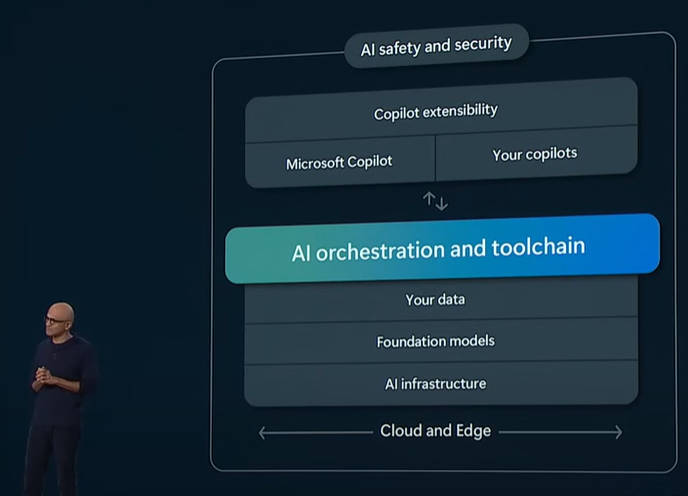
Build2024 covers end-to-end (infra to app) framework for AI era, as marked. In my view, top-5 takeaways are:

1. Microsoft made a huge splash in the PC world on Monday announcing new arm-powered “Copilot Plus PCs”  Microsoft Copilot Studio is to help developers build their copilots.


2. Microsoft is expanding AI Partnerships with LLM-Hugging Face, GPU Chip-Nvidia, Open AI-GPT4o, AI teaching-Khan academy, etc.


3. Microsoft announced Phi-3-vision, a new small language models (SLMs) with audio and vision capabilities. 


4. Real-Time Intelligence on Microsoft Fabric is an AI-powered analytics platform to offer in-the-moment decision-making for organizations


5. Microsoft is partnering with the Khan Academy for AI-powered tutoring tools that will be free for all US educators.


I'm excited to explore next Gen AIs beyond the current developer experiences of Visual Studio Copilot

Full keynote of Satya Nadella at Microsoft Build 2024 https://www.youtube.com/watch?v=8OviTSFqucI

Wednesday, May 22, 2024

Build Action appsettings


In .NET projects, the appsettings.json file is used to store configuration data. The "Build Action" property of files in a .NET project determines how the file is treated by the build process. 

This ensures that the file is included in the output directory of the build and can be read at runtime for configuration purposes.

To set the "Build Action" to "Content" for appsettings.json (or any file) in Visual Studio:

  1. Right-click on the appsettings.json file in the Solution Explorer.
  2. Select "Properties" from the context menu.
  3. In the Properties window, find the "Build Action" property.
  4. Set the "Build Action" to "Content".

When set to "Content", the file is copied to the output directory (e.g., bin\Debug\netcoreapp3.1\) during the build if the "Copy to Output Directory" property is also set appropriately. The "Copy to Output Directory" property has a few options:

  1. Do not copy: The file is not copied to the output directory automatically.
  2. Copy always: The file is always copied to the output directory, overwriting any existing file with the same name.
  3. Copy if newer: The file is only copied if it has been modified since the last build that resulted in a copy operation.

If the application setting is set as 'Do not copy', dotnet run will throw the below error

System.IO.FileNotFoundException: The configuration file 'appsettings.json' was not found and is not optional. 

Sunday, May 19, 2024

InvalidOperationException - Sequence

What?

fail: Microsoft.AspNetCore.Diagnostics.DeveloperExceptionPageMiddleware[1]
      An unhandled exception has occurred while executing the request.
      System.InvalidOperationException: Sequence contains no elements
         at System.Linq.ThrowHelper.ThrowNoElementsException()
         at System.Linq.Enumerable.Average[TSource,TSelector,TAccumulator,TResult](IEnumerable`1 source, Func`2 selector)
         at CloudWeather.Report.BusinessLogic.WeatherReportAggregator.GetWeatherReportsAsync(String zip, Int32 days) in c:\dev\micro\micorservices-weather\CloudWeather.Report\BusinessLogic\WeatherReportAggregator.cs:line 43
         at Program.<>c.<<<Main>$>b__0_1>d.MoveNext() in c:\dev\micro\micorservices-weather\CloudWeather.Report\Program.cs:line 31
      --- End of stack trace from previous location ---
         at Microsoft.AspNetCore.Http.RequestDelegateFactory.ExecuteTaskResult[T](Task`1 task, HttpContext httpContext)
         at Microsoft.AspNetCore.Diagnostics.DeveloperExceptionPageMiddlewareImpl.Invoke(HttpContext context)

Why?

The error System.InvalidOperationException: Sequence contains no elements in a .NET application typically occurs when you're using methods like First(), Last(), Single(), or SingleOrDefault() on an empty collection or sequence. 

These methods expect the sequence to have at least one element (except for SingleOrDefault(), which allows zero or one element but throws if there are more), and when the expectation is not met, the mentioned exception is thrown.

How?

To handle this error, we need to check if the sequence is empty before calling these methods: Use Any() to check if there are any elements in the sequence. If Any() returns true, it's safe to proceed.

var result = tempData.Any() ? tempData.Average(t => t.field1) : 0;