Thursday, September 12, 2024

Builder Pattern

What

Builder pattern allows the product construction in a step-by-step fashion. Though construction process can vary based on product type, it separates the construction of a complex object from its representation

Who

It has four key actors (1) Product (2) Builder (3) Concrete Builder (4) Director.

1. Product is the complex object that the Builder pattern is responsible for constructing.

2. Builder is an interface or an abstract class that declares the construction steps for building a complex object.

3. ConcreteBuilder implements the interface to provide specific implementations for building each part of the product.

4. Director is responsible for managing the construction process of the complex object.

How

(1) Construction steps are defined in the Builder interface. 

(2) Concrete Builder implements the interface to provide specific implementations for building each part of the product. 

(3) Director is responsible for managing the construction

(4) Client class creates the Director object and passes the ConcreteBuilder object to the Director object.

<pre><code>

public void Construct()

        {

            _builder.SetCPU();

            _builder.SetRAM();

            _builder.SetStorage();

            _builder.SetGPU();

            _builder.SetDisplay();

            _builder.SetOS();

            _builder.GetLaptop().ShowInfo();

        }

</code></pre>

When

Builder design pattern is best suitable for any job execution framework, where the job execution steps are common, but the job execution order can vary like Quartz job scheduler in system programming.

In the given example, the builder pattern is used to create a laptop with different configurations.

Reference

Code repository: https://github.com/gsenthilvel/DesignCreational/tree/main/prototype


Saturday, September 7, 2024

Prototype Pattern


What

Prototype design pattern is a creational pattern to create new objects by copying an existing object, known as a prototype. This pattern is particularly useful when the cost of creating a new object is high or complex.

Who

It has three key actors (1) Prototype Interface (2) Concrete Prototype (3) Client.

  1. Prototype Interface provides a blueprint for creating new objects by specifying the cloning contract.
  2. Concrete Prototype is a class that implements the clone method with cloning logic specific to the class
  3. Abstract Product is a class to initiate the cloning process without being aware of the concrete classes involved.

Where

Though prototype is similar to base/derived classes, it is more focused on object creation by cloning

  1. Design: Prototype pattern focuses on object creation by cloning, whereas a base class focuses on defining a common interface and shared behavior for derived classes.
  2. Flexibility: Prototype is more flexible when it comes to creating objects dynamically at runtime, while base classes are more static and defined at compile-time.

As a side effect, it is not advisable to use prototype pattern when objects are immutable (unchangeable) and do not need variations,

How

End user promotes a clear separation between the creation of product families with cars and their specifications. It has the following key steps:

  1. Create Prototype interface for concrete class with clone operation.
  2. Create concrete prototype class with member wise cloning from the above interface.
  3. Client class to create new objects by cloning the prototype object.

<pre><code>

public interface IObjectPrototype

{

IObjectPrototype Clone();

}

</code></pre>

When

Prototype is best fit when object creation is complex and resource-intensive- classic example is Microsoft Word.  When users create a new document, they often start from a template in Microsoft Word. 

Prototype pattern helps to clone a template document instead of creating a new document from scratch.

Reference

Code repository: https://github.com/gsenthilvel/DesignCreational/tree/main/prototype

Tuesday, September 3, 2024

Abstract Factory Pattern


What

Abstract Factory Pattern is another layer of abstraction over Factory pattern. It is used to create families of related objects without specifying their concrete classes. 

It provides an interface for creating objects in a superclass but allows subclasses to alter the type of objects that will be created.

Who

It has four key actors as below

  1. Abstract Factory is an interface for creating a family of related objects, but it does not specify the concrete classes of the objects to be created.
  2. Concrete Factory is a class that implements the Abstract Factory interface to create a family of related objects.
  3. Abstract Product is an interface for a type of product. 
  4. Concrete Product is a class that implements the Abstract Product interface to create a specific type of product.

How

End user promotes a clear separation between the creation of product families with cars and their specifications. It has the following key steps:

  • Create an interface for the Abstract Factory with a method to create a family of related objects.
  • Create an interface for the Abstract Product with a method to describe the product.
  • Create a Concrete Factory class that implements the Abstract Factory interface to create a family of related objects.
  • Create a Concrete Product class that implements the Abstract Product interface to describe the product.
  • Create a client class that uses the Abstract Factory and Abstract Product interfaces to create and describe a family of related objects.

When

Classic real-life example of Abstract Factory pattern is GUI toolkit like button, checkbox, menu across different operating systems like Windows, Linux Mac.

Where

Though Factory and Abstract Factory look similar, it has significant differences

Factory pattern has three key elements 

  1. create objects without mentioning exact class 
  2. single product type focus with less complexity
  3. lower-level abstraction

Abstract factory pattern has the following key elements

  1. create family of related objects without specification 
  2. multiple product type focus with more complexity
  3. higher level abstraction

Reference

Code repository https://github.com/gsenthilvel/DesignCreational/tree/main/abstractfactory

Sunday, September 1, 2024

Factory Pattern


Factory pattern is one of the most used creational design pattern in real world applications, like DB, Logging frameworks. It is used to create objects based on a common interface.

Without Factory

End user is responsible for creating the object by directly instantiating the class based on the input type during its construction.  It has limitation of tightly coupling, limited scalability and single responsibility violation.

<pre><code>

if (carModel == 1)

{

_evCar = new Tesla();

}

</code></pre>

With Factory

Two key actors in Factory design (1) underlying product (2) creator factory. Both actors are driven by interface with multiple derived classes.

It is a design pattern that provides an interface for creating objects in a superclass,  but allows subclasses to alter the type of objects that will be created.

<pre><code>

ICarFactory carFactory = new CarFactory();

_evCar = carFactory.GetCar(carModel);

</code></pre>

Benefits

The Factory pattern is useful when you need to create an object based on a specific input or condition. It has few design advantages like: decoupling of creation logic with client usage, code reusability, scalability with extensibility and single responsibility principle.

Reference

Code repository: https://github.com/gsenthilvel/DesignCreational/tree/main/factory 


Saturday, August 24, 2024

Singleton Pattern


One of the easiest models, used in Creational design pattern

What?

It is a design pattern that restricts the instantiation of a class to one object. 

This is useful when exactly one object is needed to coordinate actions across the system.

Why?

I can think of a few scenarios where the Singleton pattern is useful.

On usage of a shared resource, like a database connection, or a logger, Singleton pattern makes sure that it has one instance of that resource.

When?

When you need to have a single instance of a class, and you want to provide a global point of access to the object.

It can be instantiated in two ways, either lazy or eager.

1. Eager instantiation is when the object is created when the class is loaded.

2. Lazy instantiation is when the object is created only when it is needed.

<pre><code>

private static readonly Lazy<Singleton> _instance = 

            new Lazy<Singleton>(() => new Singleton());

</code></pre>

How?

Key components of Singleton pattern are:

1. Static member: 

Static member ensures that memory is allocated only once, preserving the single instance of the Singleton class.

<pre><code>

private static Singleton instance;

</code></pre>

2. Private constructor:

Private constructor ensures that the class cannot be instantiated from outside the class.

<pre><code>

private Singleton() {}

</code></pre>

3. Public static method:

Public static method provides a global point of access to the Singleton object.

<pre><code>

public static Singleton Instance

{

get

{

return _instance.Value;

}

}

</code></pre>

Where?

Code repository: DesignCreational/singleton at main · gsenthilvel/DesignCreational (github.com)


Friday, August 16, 2024

sarvam.ai


Sarvam-2B: India's first open-source small language model trained on 10 India languages (Hindi, Tamil, Telugu, Malayalam, Punjabi, Odia, Gujarati, Marathi, Kannada, and Bengali) & English

Founded by a team of passionate experts, they aim to lead transformative research in AI that will make development, deployment, and distribution of GenAI apps in India significantly robust, performant, and cost-effective.

With Sarvam's generative AI building blocks, enterprises can unlock new market opportunities, establish direct and deeper connect with their customers.

Demo website: https://www.sarvam.ai/

HF checkpoint sarvam-2b-v0.5: https://huggingface.co/sarvamai/sarvam-2b-v0.5


Friday, August 2, 2024

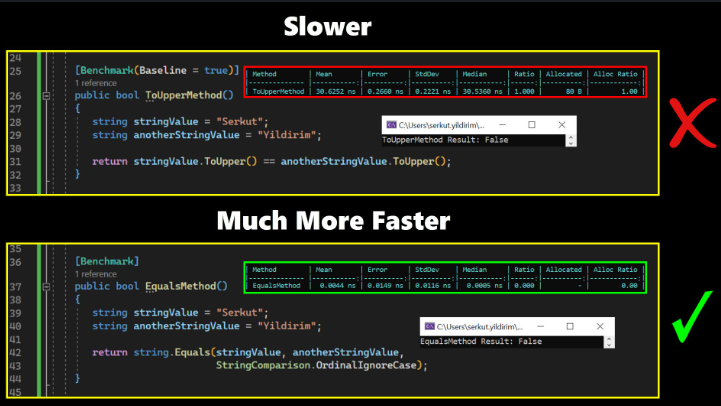
String Compare performance


In .NET code, "ToUpper" and "ToLower" methods can impact performance due to memory allocation, string copying, and potential garbage collection, especially in situations involving large strings or frequent conversions.

Performance-wise, string.Equals is faster than the above methods due to direct character comparison, avoiding memory allocation, and reducing overhead for case-insensitive string comparison.

Best approach is to leverage SringComparion.OrdinalIgnoreCase to compare strings using ordinal(binary) sort rules and ignoring the case of the strings being compared.